and 2k+ other customers
Flexible Desk Cooling Fan with Time Display
Flexible Desk Cooling Fan with Time Display
 Fast USA Shipping
Couldn't load pickup availability
Stay Cool and Productive at Your Desk
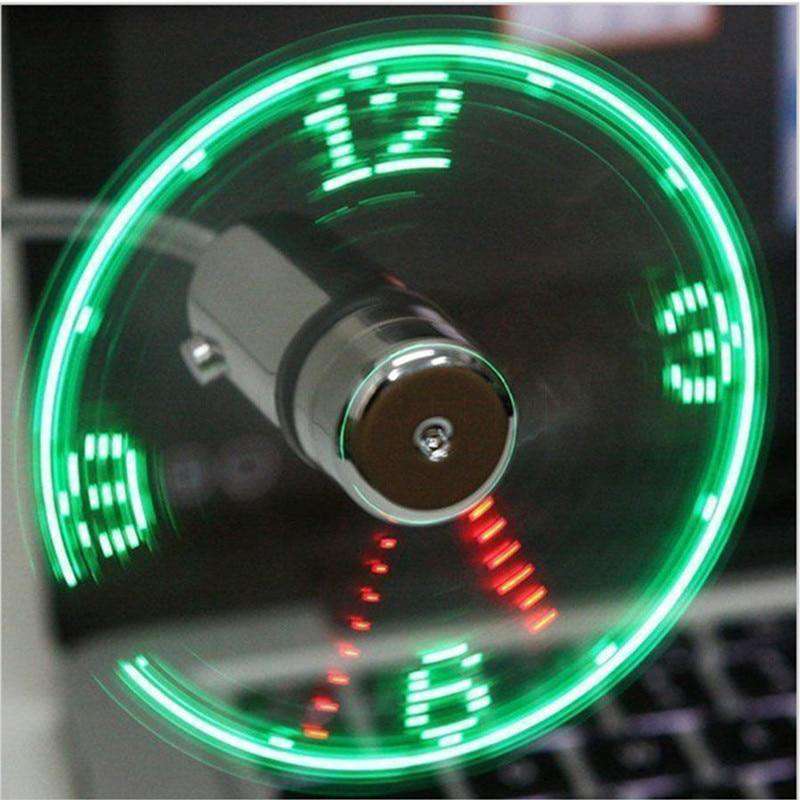
Beat the heat and add a fun touch to your workspace with this USB LED fan clock. It combines a refreshing desk fan with a unique LED time display that appears as the blades spin, keeping you cool while showing the time in an eye-catching way.
Designed for everyday office or home use, it delivers steady airflow while adding a modern, playful element to your desk setup.

Safe, Flexible, and Easy to Use
Built with soft yet durable blades, the fan is completely safe to touch, even while running. The flexible metal neck lets you adjust the angle and height easily, so you can direct airflow exactly where you need it for maximum comfort.
Simply plug it into any USB power source and it’s ready to use — no batteries or complicated setup required.

Clear LED Time Display
As the fan spins, bright LEDs form a clear clock display showing hours, minutes, and seconds. The built-in memory feature ensures the time is saved even after unplugging, so you won’t need to reset it each time you reconnect the fan.

Simple Time Adjustment
Setting the time is quick and intuitive using a single button. The clock automatically saves your settings after a few seconds of inactivity, making daily use effortless.

Why You’ll Love It
- Cooling desk fan with built-in LED clock
- Safe, soft blades for worry-free use
- Flexible neck for adjustable airflow direction
- USB powered for convenience
- Time memory function saves settings
- Compact and lightweight for desks or laptops
How to Use
- Plug the fan into a USB port (laptop, power bank, or adapter).
- Press the button once to turn on the fan and activate the LED clock display.
- Press and hold the button until the minute indicator begins to blink, then release.
- Press and hold again to rotate the display and set the correct time.
- Release the button when the desired time is shown.
- Fine-tune the time by pressing the button once for each minute adjustment.
- Wait a few seconds — the time will automatically save without further input.